Can ChatGPT build a website? Yes, and edit yours

On this page
The answer to "can ChatGPT build a website" is yes, in two senses. ChatGPT can write the code for a site, which usually leaves the hosting and upkeep to you. It can also work on a site you already keep on a hosted website builder: a connector lets it read your pages and edit them when you ask in a chat. This guide covers both briefly, then walks through the second on FolioPage, from connecting ChatGPT to restoring a page it changed.
What ChatGPT builds, and what it leaves to you
OpenAI's use cases for ChatGPT and Codex include a web development collection for building responsive UI from designs and prompts. Code still has to be put online: you find a host, connect a domain and add a service that receives the contact form, and every later change means going back to the code. On eligible plans ChatGPT can also create a site and host it, a feature OpenAI lists as a public beta whose availability and limits vary by plan and region.
Editing an existing site asks for no code. ChatGPT supports both read and write tools from a custom MCP server, and a website builder that runs one keeps hosting your site while ChatGPT changes it. Your part is your own text and pictures, a yes or no to each change, and a check of the result.
The rest of this guide shows that on FolioPage, the portfolio website builder that publishes this magazine. If Claude is the assistant you use, Can Claude build a website? covers the same ground for it.
What you need
FolioPage hosts portfolio websites and runs a server for MCP, the Model Context Protocol, through which a service offers its functions to an AI assistant. Nothing in FolioPage designs or writes a site by itself. The server gives ChatGPT tools, and each one does something you could do by hand in the dashboard: read a page, change a section, add a project. The features page shows how that looks.
You need a FolioPage site and a paid ChatGPT plan. Starter, Pro and Max all include editing through an assistant, and so does the 14-day free trial.
Start your site from a template
ChatGPT edits a site that exists, and none of its tools creates one, so the first step happens in your browser. The gallery has over 100 templates, and every one opens as a working site you can click through first. Use this template takes you through sign-up to a form that is already filled in for your first site. The site goes online on a folio.page address once your email is verified.
Then upload your pictures to the media library, since ChatGPT cannot add files to your site. If you have not chosen the work or planned the pages yet, how to build a portfolio website in a day walks through both, and more how-tos are collected under Guides.
Connect ChatGPT to your site
Check your ChatGPT plan first. Adding a custom server is part of ChatGPT's developer mode, and developer mode is on paid ChatGPT plans. On ChatGPT without a subscription, the steps below will not work.
Get the server address from FolioPage
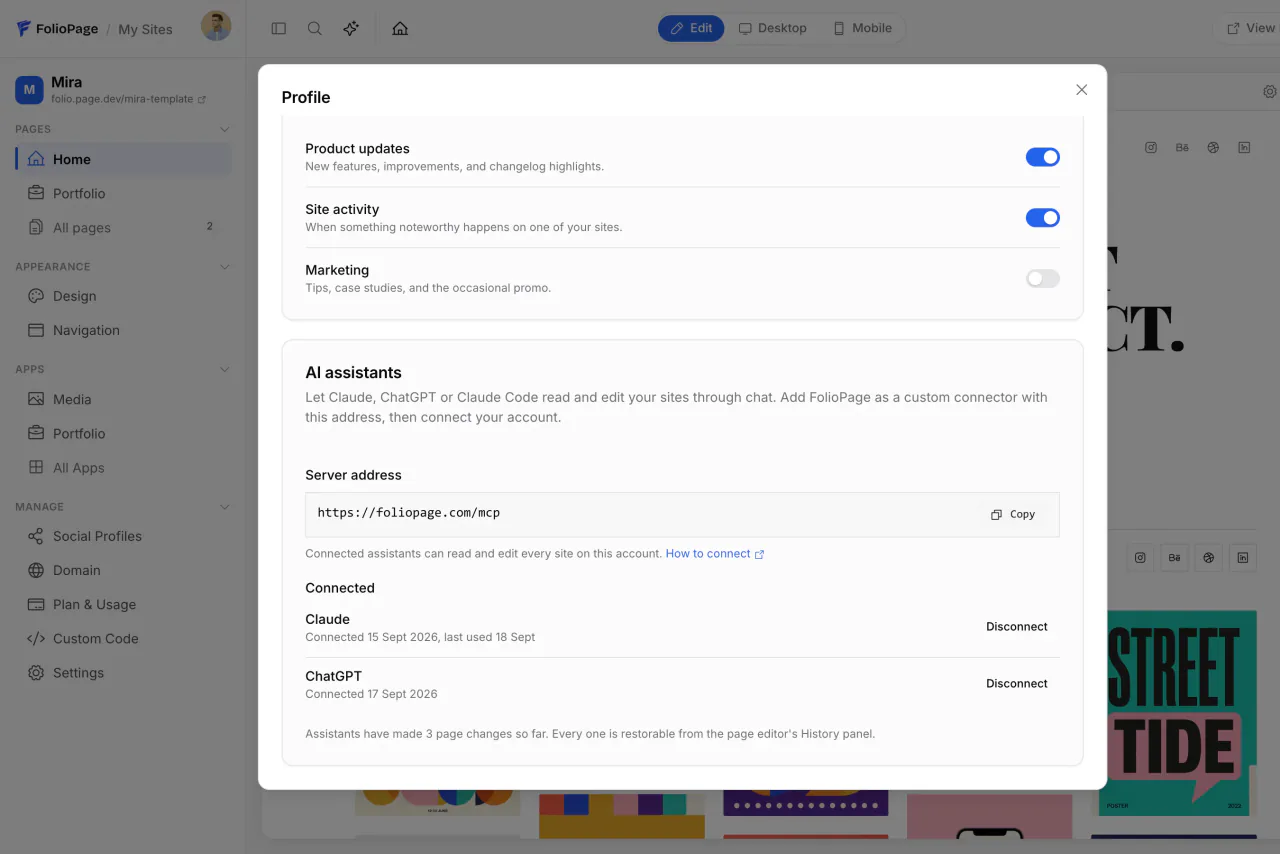
Log in to FolioPage and click the sparkle icon at the top of the dashboard. The AI assistants dialog opens with the Server address, https://foliopage.com/mcp, and a Copy button. The same card is in Profile.
Add FolioPage in ChatGPT
Do this in ChatGPT on the web. OpenAI's guide to connecting a custom MCP server lists the steps: go to ChatGPT Plugins, select the plus button, then Add custom MCP server. Enter a name such as FolioPage, paste the address into Server URL under Connection, and choose OAuth as the authentication. Review the risk warning, select I understand and want to continue, then Create as a plugin, which is ChatGPT's name for the connection. Install the plugin before you use it in a chat. OpenAI's guide has no separate step for developer mode. If Add custom MCP server is missing behind the plus button, switch on Developer mode in ChatGPT's settings, then start this step again.
Allow the connection on FolioPage
When ChatGPT sends you to FolioPage, log in if asked. The page names the account you are signed in to and lists what the assistant will be able to do: read your sites, pages, sections, design, navigation and media, and edit pages, sections, design and app content. It cannot delete sites or pages, change your account or touch billing, and the page says so. Click Allow.
Ask a first question
In a new chat, type @ in the prompt box and select the plugin, as OpenAI's guide describes. Start with a request that changes nothing: "List my FolioPage sites and the pages on each one." If you have several sites, say once which one you mean, by its name or its folio.page address, and ChatGPT stays with it for the rest of the chat.
ChatGPT's menus change. Where yours differ from these steps, follow OpenAI's guide linked above, which is the current reference. The FolioPage help article Edit your site from Claude or ChatGPT has more requests to try.
FolioPage marks its reading tools as read-only. OpenAI's guide says write actions require confirmation by default and tells you to review the input a write action will send, so ChatGPT asks before each edit.
What to ask ChatGPT, job by job
A request can be brief, because ChatGPT looks at the page before it touches it. It works one section or one setting at a time and reports the page address after each change so you can check. Each request below matches something the tools can do, with names to swap for your own.
Page text and sections
- "On the About page, replace the second paragraph with the text I paste below and leave the rest alone."
- "Add a call-to-action section at the end of the About page that says 'Booking for spring', with a button to the Contact page."
- "Hide the pricing section on the Services page until I ask for it back."
New sections come from the editor's library of more than 750 sections.
Projects in the Portfolio app
- "Start a draft project called Tidewater Menus with the description I paste below. I will pick the images later."
- "Attach the three newest images in my media library to the Drift project and make the second one its cover."
Your resume
- "Change the headline on my resume to Packaging and identity designer, and shorten the summary to two sentences."
- "Add Figma and After Effects to the skills on my resume."
A resume update replaces the whole document, and the PDF version is rebuilt automatically. If the Resume app is off on your site, ask ChatGPT to switch it on.
Your links page
- "Add a link to my links page titled Workshop dates. The address is below. Open it in a new tab."
- "Rename the link Shop to Print shop and give it this description: signed risograph prints."
The site's design
- "Change the accent color to #1f3a5f and leave the other colors as they are."
- "Set the headings in a serif from the font list and keep the body font."
Pages and the menu
- "Create a page called Process and add it to the menu after Projects."
- "Set the meta description of the Services page to one sentence about what I offer, under 155 characters."
Publishing and site settings
- "Publish today's changes to the live site."
- "Change the site's contact email to the address I paste below."
Every edit is saved at once, yet visitors still get the cached copy of your site until the changes are published. In the dashboard, the same publish is the Update live site button. ChatGPT can also change the setting that lets search engines index your site, but a trial site stays hidden from them whatever that setting says, until a plan is paid.
Every page edit is a version in Page history
Before ChatGPT edits a page, FolioPage stores the page as it stood, and it keeps the last 50 of these versions for each page. To restore one, go to the page in the editor. The clock button at the top right of the browser frame is Page history. Under Assistant changes, each version starts with "Before:" and names the edit that followed, with the time and the assistant's name. Click a version and the page returns to it. The version you leave is kept at the top of the same panel, in this browser, so a restore can be reversed too.
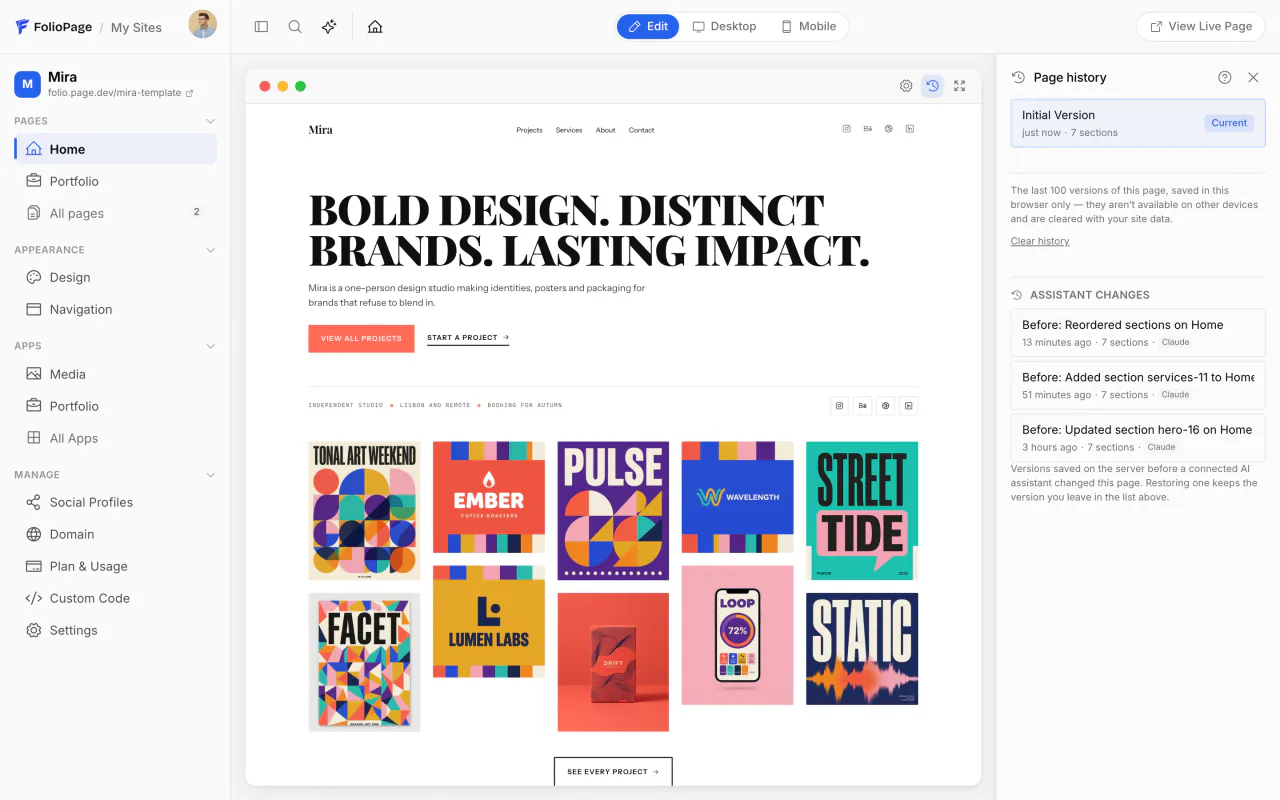
The chat can do the same: "Undo your last change to the About page." To see what was done, ask "List the page changes you made on my site today."
Three other kinds of change can be put back by asking: design, the menu and the resume. For those, FolioPage hands ChatGPT the previous values with the result, so it can restore them.
A version holds a page's sections and its heading. Everything else is changed in place, with no earlier copy kept: a page's title and meta fields, projects in the Portfolio app, links, blog posts, site settings, and apps switched on or off. Check the result right after each of those requests, and correct a wrong one in the chat or by hand in the dashboard.
What ChatGPT cannot do on your site
FolioPage leaves some jobs out of the tools on purpose:
- Starting a new site, and deleting or resetting one. Deleting a page is yours too.
- Anything to do with domains, billing or your account.
- File uploads. ChatGPT works with images that are in your media library already.
Four actions are allowed but come with an instruction from FolioPage's server to check with you first: taking a site online or offline, replacing the whole menu, deleting a section and overwriting a resume.
Disconnect ChatGPT
Click the sparkle icon again, or open Profile and scroll to AI assistants. Find ChatGPT under Connected and click Disconnect. Its access stops at once and your site stays as it is.
Plans and price
No FolioPage plan charges extra for editing through an assistant. Starter is $6 a month, Pro is $12 and Max is $24, and the trial needs no credit card. Your ChatGPT subscription is separate.
Your plan's limits apply to ChatGPT's work too. On Starter that means 10 pages, 20 sections on a page, 25 Portfolio projects and 15 links. When a request runs into a limit, ChatGPT passes on a message that names the plan that lifts it.
The site sits on a folio.page address on every plan, and connecting your own domain is a Pro and Max feature. ChatGPT can write blog posts only on Max, because the Blog app belongs to that plan alone.
Common mistakes
Leaving ChatGPT to supply the facts
FolioPage's server tells the assistant to keep your voice and your facts, and never to invent credentials, clients or prices. That only works when the facts are in your message, so paste the price list, the bio as you want it, and the names and dates of a project.
Letting ChatGPT remember an approval too soon
ChatGPT can remember your approval of a tool for the rest of a conversation. OpenAI's guide advises allowing that only when you know and trust the application to make further write actions without your approval. Approve each edit yourself until you have seen several land the way you meant.
Can ChatGPT build a website without coding?
Yes. One way is to keep the site on a hosted website builder that ChatGPT can connect to, so hosting is handled and you ask for changes in a chat. Code that ChatGPT hands you to publish somewhere else still needs someone to host and maintain it.
Do I need a paid ChatGPT plan to edit a FolioPage site?
Yes. A custom server is connected through ChatGPT's developer mode, and paid ChatGPT plans are the ones that have it.
Can ChatGPT change my live site without asking?
By default it asks: OpenAI's documentation says write actions require confirmation. An approved edit reaches visitors only after the changes are published, which is one more action ChatGPT asks about.
Give ChatGPT a site to work on.
Start from a template, get it online on a folio.page address, then connect ChatGPT and ask for the first change. The trial runs 14 days and needs no credit card.
Start free