How to make a graphic design portfolio, one project page at a time

On this page
To make a graphic design portfolio, choose six to nine of your strongest projects, write each as a short case study (brief, process, solution, outcome), and publish them on a website with an about page and your contact details. That is the short version of how to make a graphic design portfolio. The rest of this guide fills it in for students, recent graduates and freelancers building a first or a next one.
The longest section takes one project page from a live template apart, element by element, and the guide ends with the order to build the site in.
Decide what the portfolio is for
Start with the question the University of Oregon's College of Design puts to its students: "Who are you creating your portfolio for?" For a graphic designer the answer is usually one of two readers.
- A job. The reader is an art director or a recruiter comparing applicants. Show how you reached each result and what part you played on team projects.
- Clients. The reader is a business owner with a problem of their own. Lead with finished work for businesses like theirs and make the way to start a project easy to find.
If you want both, build for the reader you want more of and give the other one a page, as the magazine's guide on how to build a portfolio website in a day advises.
How many projects should a graphic design portfolio include?
A graphic design portfolio should include six to nine projects. Published advice sits around that number: AIGA Baltimore's portfolio guide says "It's better to have 5-7 amazing projects than 10-15 projects that aren't so great", and Maine College of Art & Design advises applicants to its graphic design program to select six to ten.
Go to the low end when every project is a full case study, and to the high end when you work in several disciplines and need a project or two for each. The same range holds for a PDF sent with an application: Creative Lives in Progress, in its guide to PDF portfolios, puts the count at "normally between five and ten" and advises staying below ten.
Which projects make the cut
- Work you want more of. Creative Lives in Progress notes that a portfolio "can help you attract the kind of work you want to be commissioned for".
- One project per skill. The Maine college's guide says: "Each piece should demonstrate a different skill, perspective, or creative approach whenever possible."
- Only work you can explain. AIGA Baltimore's advice for a review: "Be ready to discuss the goal of the project and how you reached the solution." A project you cannot talk through comes out.
- Strongest first, another strong one last. AIGA Baltimore recommends "starting and ending with an awesome piece".
What goes in one case study
A case study is a project with its reasons attached. Four parts cover it, in this order:
- The brief. Who asked, what for, and the limit you worked inside. "A community choir needed one poster for a whole season, printed in two colors" is enough.
- The process. What you tried on the way: research, sketches, revisions. Pick two to four images that show a decision being made, such as a rejected option beside the chosen one.
- The solution. The finished work, large, and then in use: the poster on a wall, the pack on a shelf, the identity across its applications. Give the reason behind each main decision.
- The outcome. What happened next: it launched, the client shared a figure, it won an award. For student work, say what you learned. With no result to report, end on what you delivered, and leave out any number you cannot back up.
State your part on any project you did not make alone, credit the others, and keep the text short.
A portfolio with no client work
You can make a graphic design portfolio without a single client. The Maine College of Art & Design guide says so directly: "You do not need professional client work to create a compelling portfolio." Creative Lives in Progress says the same to job applicants, who "can include self-initiated projects, rough ideas, drafts or experiments".
Three kinds of project fill the gap:
- Course assignments. Use the assignment as the brief and name the course.
- Self-initiated projects. Write yourself a brief with a real constraint: an audience, a format, a deadline, a print budget.
- Redesigns. Take something that exists and solve a problem you can name. Say on the page that the work is unsolicited and that you have no tie to the brand.
Then treat each one like paid work, with the same four parts and the same care in photographing the result. Label it honestly: where a client's name would go, write "Self-initiated" or the name of the course.
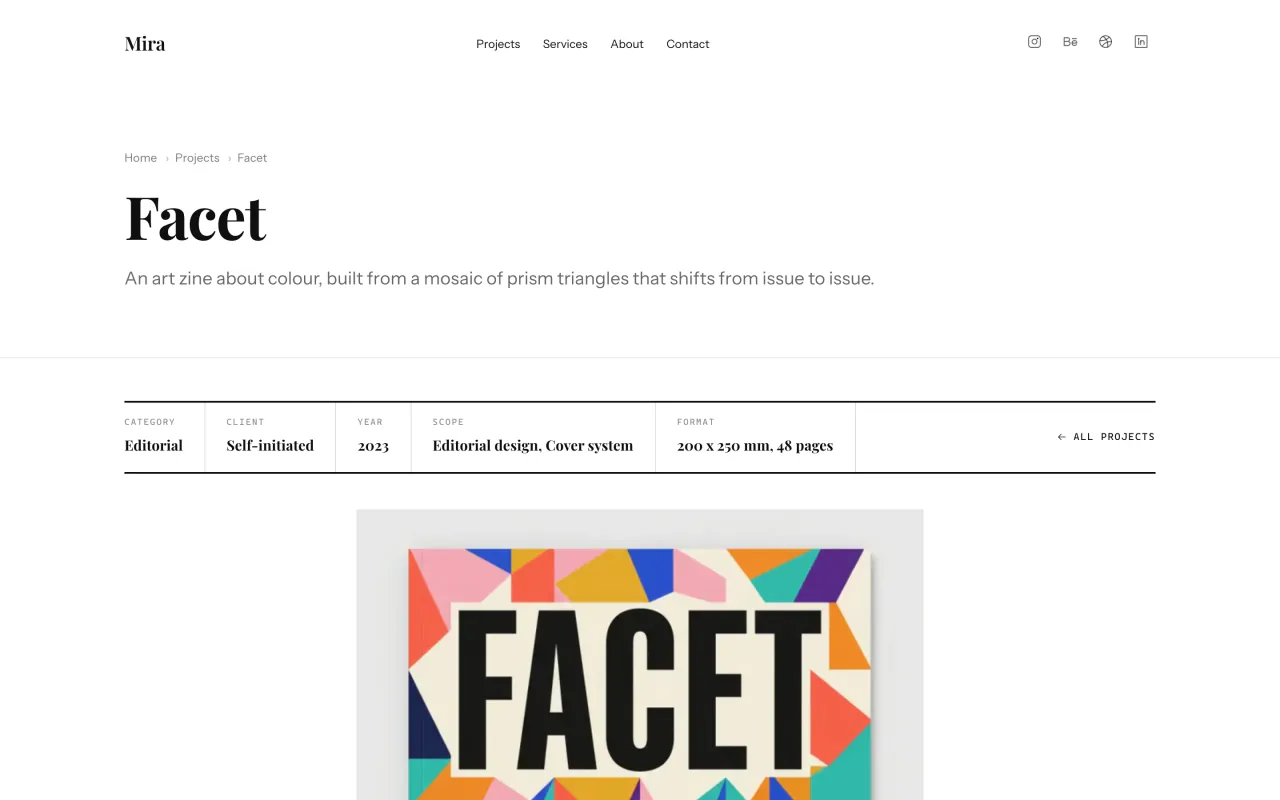
The Mira template's sample portfolio does this: Facet, a zine about color, has "Self-initiated" in its Client cell.
One project page, taken apart
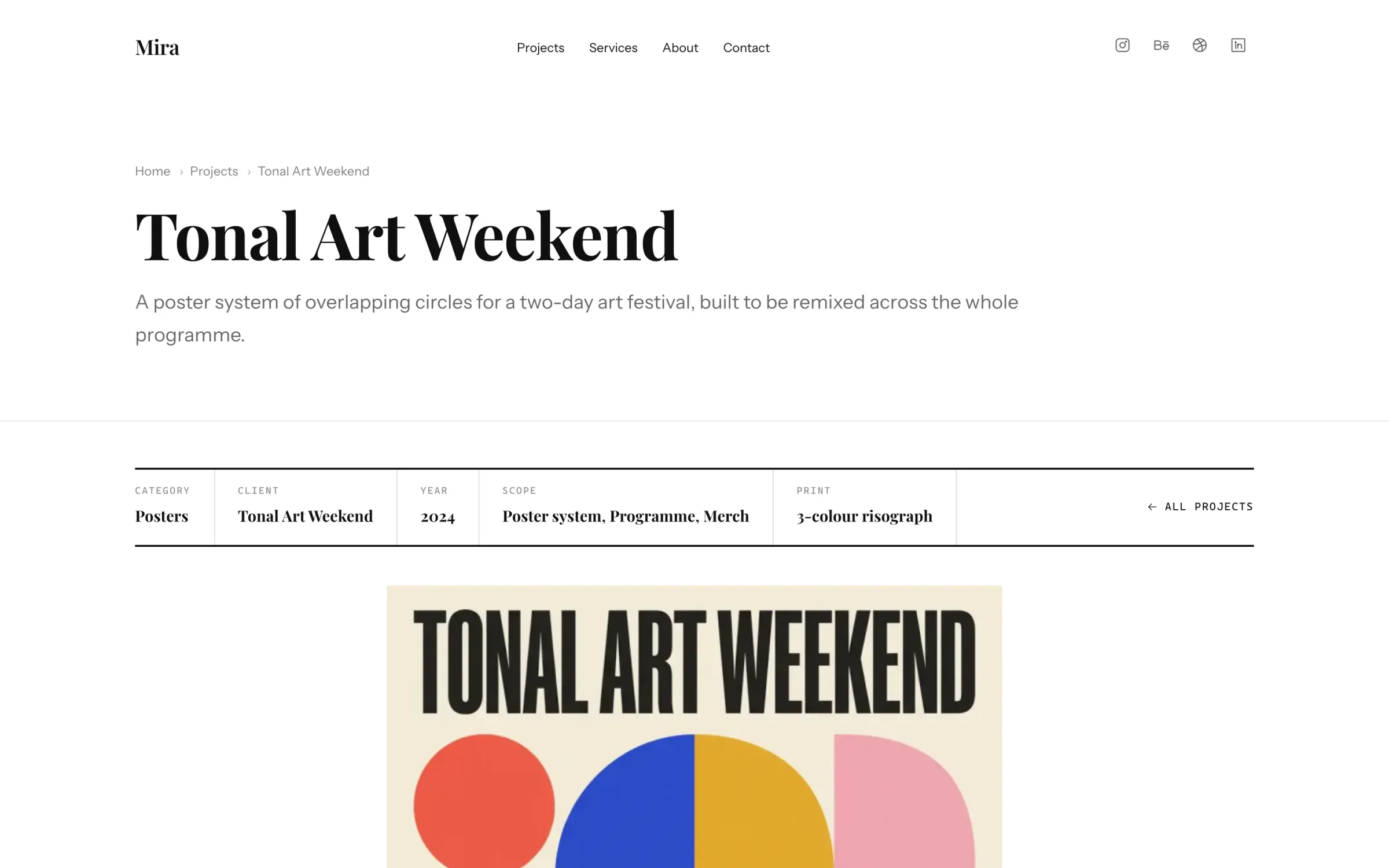
The four parts of a case study need places on a page. The page below is from the live demo of Mira, a FolioPage template for graphic designers. It shows a sample project, Tonal Art Weekend, in a layout the template picker calls Showcase.
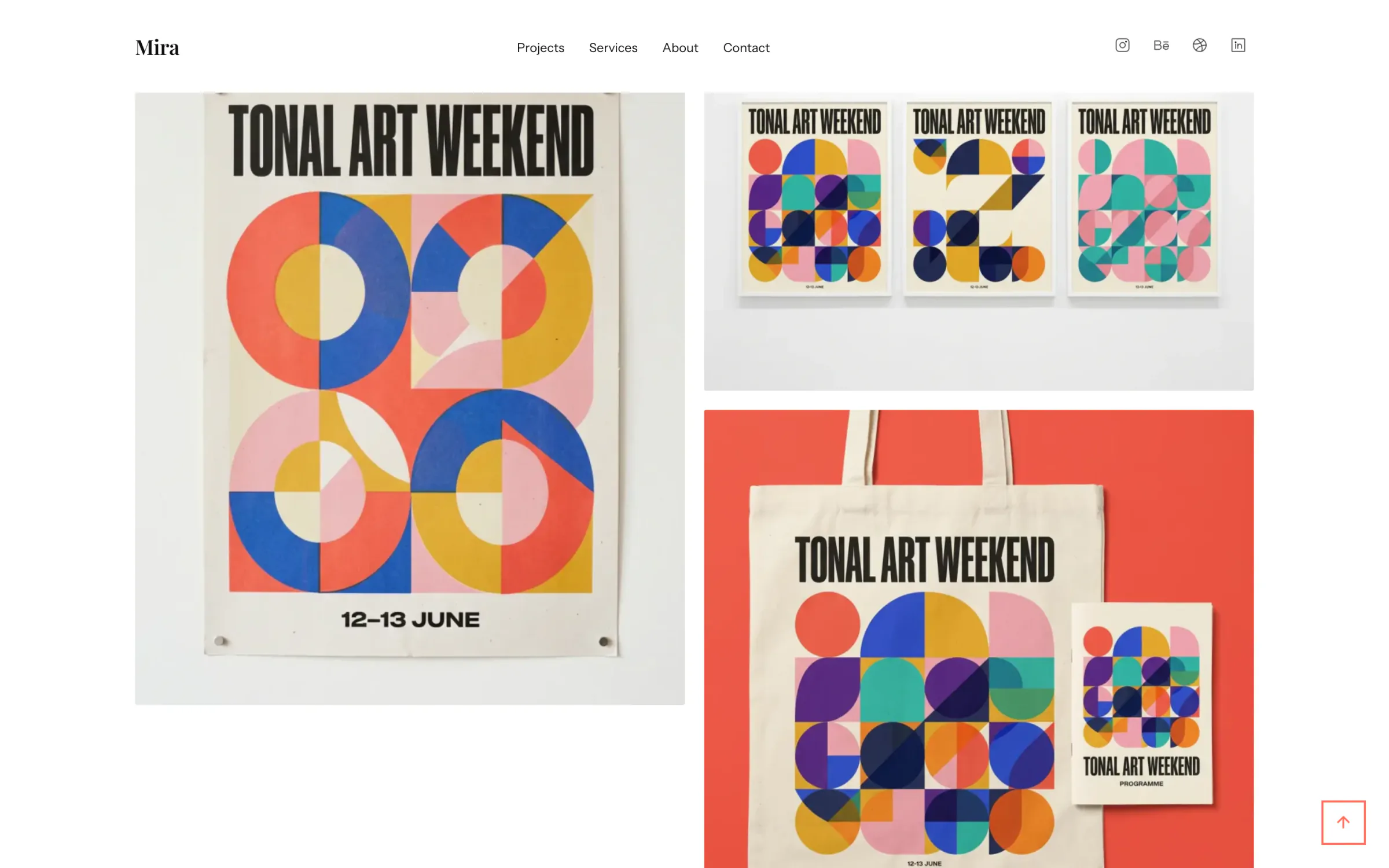
The trail and the title
A breadcrumb trail (Home, Projects, Tonal Art Weekend) sits above the project's name. A visitor who lands here from a forwarded link sees that there is more work one level up. The title is the name of the project or the client, which tells a visitor more than a number would.
The one-line summary
Under the title, one sentence says what was made, for whom and on what idea: a poster system of overlapping circles for a two-day art festival, built to be remixed. A reader who stops here still knows what the project is.
The spec bar
A ruled row of labeled cells follows: Category, Client, Year, Scope and Print. These are the facts a reviewer would otherwise dig out of the text, and with them in a row the description does not have to repeat them. Other sample projects swap Print for Role or Format.
The lead image
One image comes next, uncropped and at its own proportions: the finished poster. It is the image that stands for the project in the grid, so a visitor sees what they clicked, larger. The solution is on screen before a word explains it.
The description
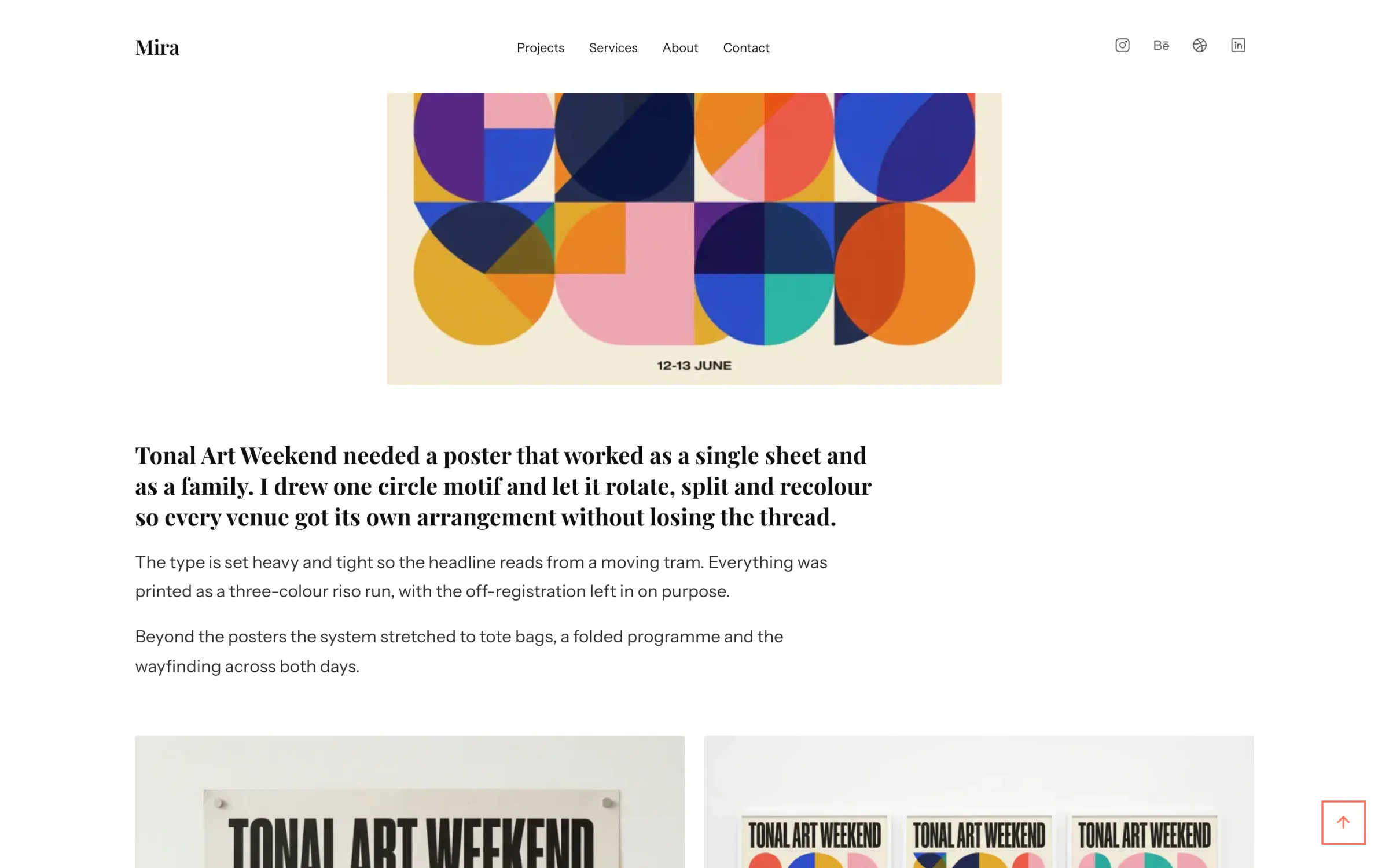
On a desktop the text runs in a column two thirds the width of the page, with its first paragraph set larger in the heading typeface. The sample uses that paragraph for the brief ("Tonal Art Weekend needed a poster that worked as a single sheet and as a family.") and for the idea that answered it, one circle motif rotated, split and recolored for each venue. The second paragraph gives reasons: the type is heavy and tight so the headline reads from a moving tram.
The gallery
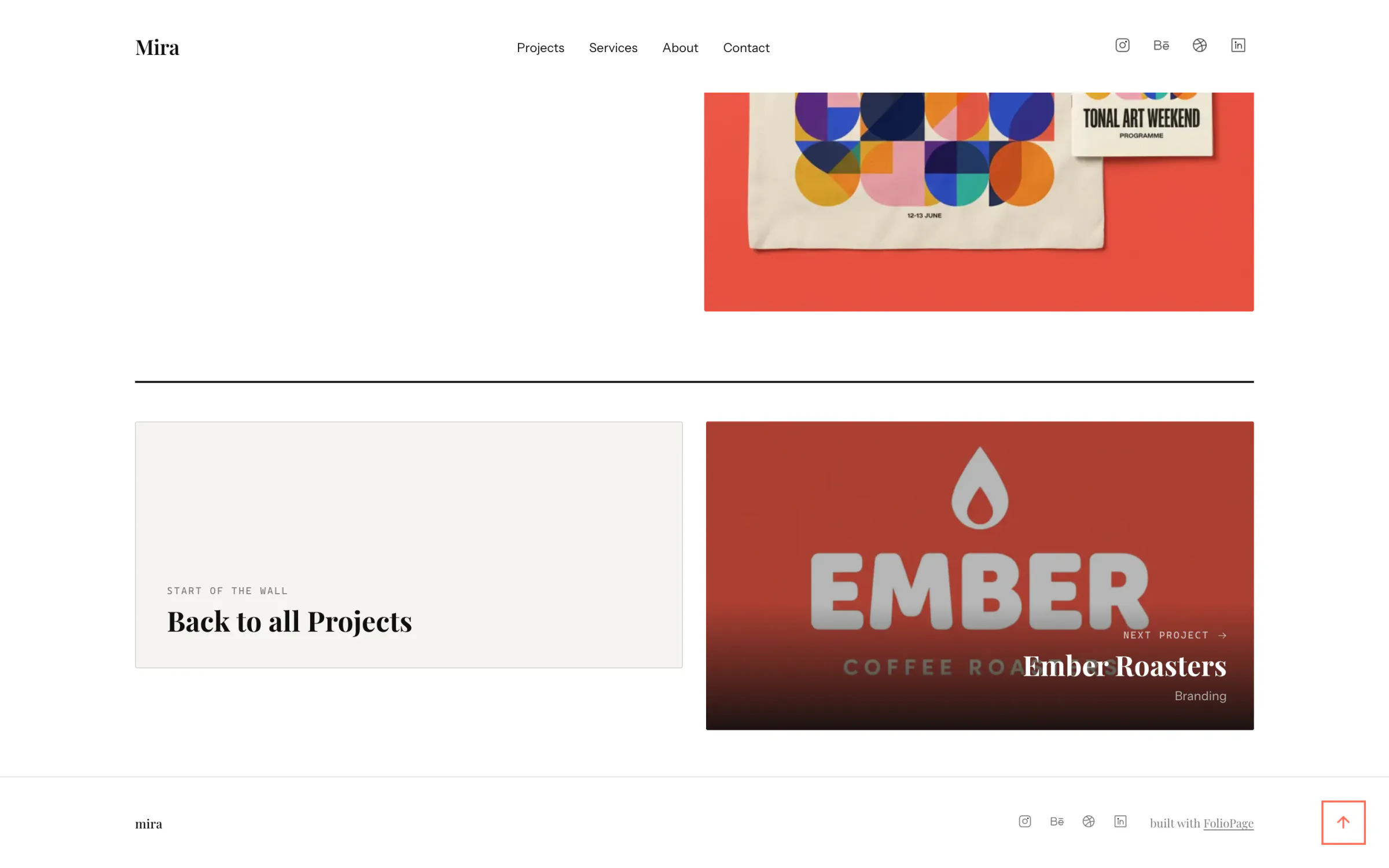
The remaining images sit in two columns on a desktop and one on a phone, in the order set in the editor. Here that is a poster pinned to a wall, three variants framed side by side, and a tote bag with the program. Each does a different job, which is the test Creative Lives in Progress sets: "Each image should serve a purpose, so avoid including two images that do the same job."
The next project
The page ends on two cards for the previous and the next project. Tonal Art Weekend is the first project, so its left card leads back to the full list. A reader who finishes one case study is handed the next, in the order you chose.
What the sample leaves out
The sample stops at the deliverables: it has no outcome and no process image. On your own page, put the sketches and a rejected option in the gallery ahead of the applications, and give the outcome the last paragraph of the description or one more cell in the spec bar.
Each element you fill in is a field in the Portfolio app's item editor: Title, Excerpt for the one-line summary, Description, Images with one marked as primary, Category, and Custom Fields for the spec bar. The trail and the next-project cards are built for you, from the title and the order of the projects.
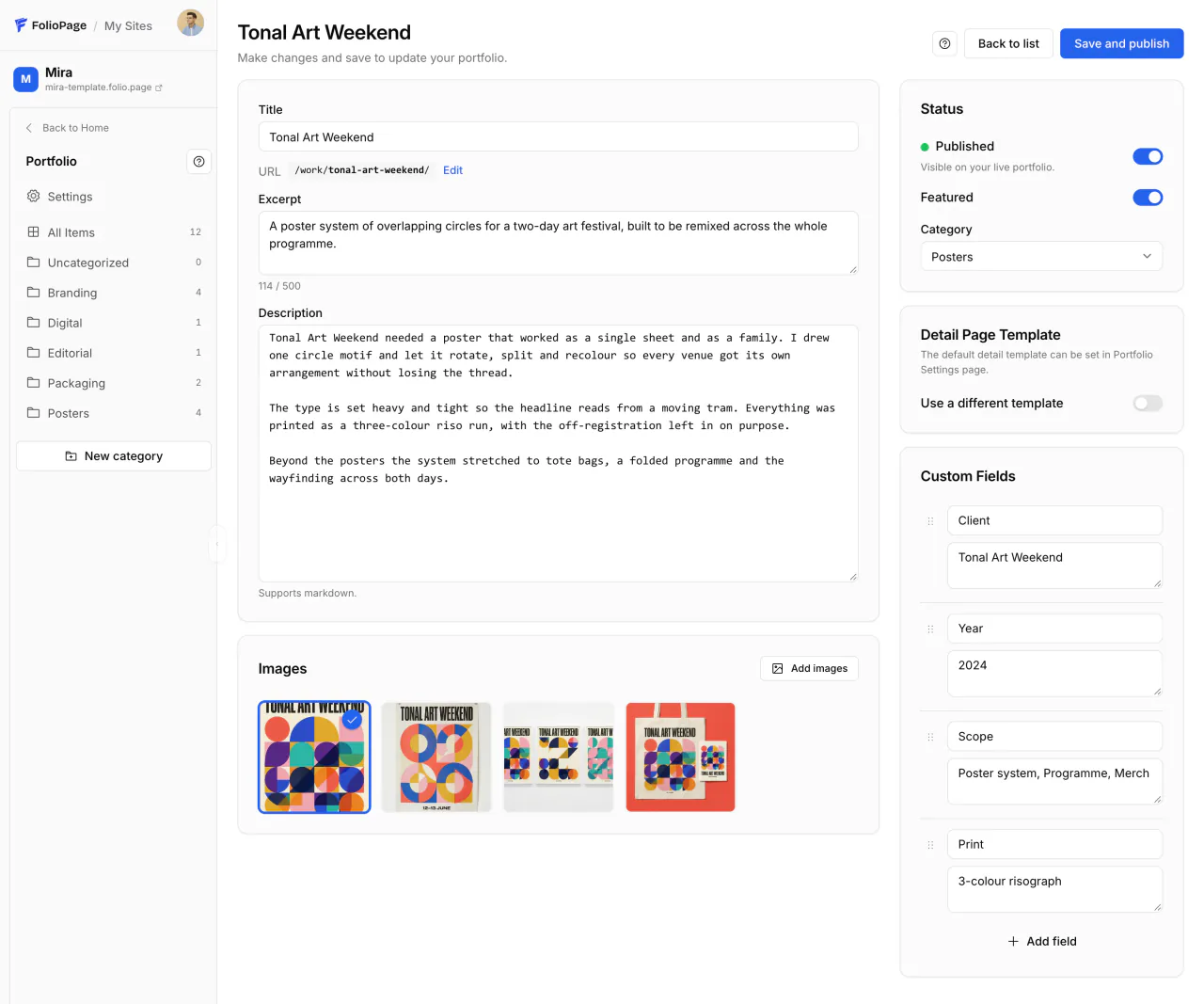
Other design templates arrange the same fields in other layouts. The type and colors of the page come from the design editor, which the design portfolio website guide covers together with custom CSS, work under NDA and the plans.
A website or a PDF
Most graphic designers need both, for different moments. Creative Lives in Progress says that for applications a PDF portfolio "is usually the standard format" and that the file should "ideally be no more than 10MB in size, and 25MB maximum to meet email attachment size limits". AIGA Baltimore suggests one to two pages per project in such a document.
The website is the full, current version: every project with all its images, at an address that fits on a resume and in an email signature. Keep it as the source and cut each PDF from it: the projects that fit the role, shortened, with the site's address on the first and last page. The magazine's interior design portfolio guide sets print, PDF and website side by side.
The about and contact parts
Both parts can be short. On Mira they are sections of the homepage: the about section holds a portrait, a one-line statement of what the designer does, two short paragraphs and a list of selected clients, and the contact panel holds the email address and a form whose messages are emailed to you. For a job search, FolioPage's Resume app publishes a resume page and a PDF from the same content. It is switched off in Mira, so open All Apps and click Enable next to Resume. The magazine's guide to a resume website covers the rest.
The order to build the site in
Prepare the content before you open a template, then build one project page completely before the others. With the work chosen, the order is:
Write every case study in a document
For each project: the one-line summary, the brief, the reasons, the outcome, and the facts for the spec bar. A missing outcome or process image shows up here, while it can still be found.
Export the images
Per project: one lead image, the process images and the finished work in use, named by project.
Choose a template by its project page
On the Design templates page, open a template and click Preview the live demo. Open a project and compare that page with your document, then click Use this template.
Build your strongest project in full
Open Portfolio and click New item. Fill in Title, Excerpt and Description, click Add images and drag the images into order. Hover the lead image and click the star, Set as primary. Add the facts with Add field under Custom Fields, pick a Category (create one with New category), switch on Published and click Save and publish. Then read the live page from the top.
Repeat with the same fields
Add the other projects with the same custom field labels in the same order, so the spec bar reads alike on every page.
Set the order
On All Items, with the sort on Manual, drag the strongest project first and another strong one last. With Default sort on Manual order in the Portfolio settings, the Projects page and the previous and next cards follow that order. On Mira, the homepage wall is a section with its own Order setting.
Rewrite the homepage, the about and the contact sections
Replace the sample line, the bio and the address with yours.
Check on a phone and publish
Open the site on a phone. A first site goes live at its yourname.folio.page address when you confirm your email. If the sidebar says Not published, turn on Publish site in Settings and click Save changes. During the 14-day trial it is open to anyone who has the link and hidden from search engines. Choosing a plan makes it indexable and keeps it online.
Each of these design templates comes with the Portfolio app switched on and sample projects to replace.
Templates made for graphic work


What if I have fewer than six finished projects?
Show the finished ones as full case studies. Five strong projects are inside the range AIGA Baltimore recommends, and self-initiated projects can be added one at a time.
Is a PDF portfolio still acceptable?
Yes. For job applications a PDF portfolio is, in the words of Creative Lives in Progress, "usually the standard format". Its guide advises a file of 10MB or less where possible and 25MB at most.
Build your strongest project page first.
Pick a design template, turn one project into a case study and publish it on a folio.page address. Free to try for 14 days, no credit card.
Start freeNo account is needed to look first: open the Mira template, click Preview the live demo and go through a project page. This guide is part of the magazine's Design section, and the other how-tos are in Guides.